Day Six: Two Geeks Under 30 Who Saved the Apollo 11 Mission
“Houston, Tranquility Base here. The Eagle has landed.”
– Apollo 11 commander Neil Armstrong from the lunar landing module
“Roger, Tranquility. We copy you on the ground. You got a bunch of guys about to turn blue. We’re breathing again. Thanks a lot.”
– CapCom (and astronaut) Charlie Duke in Mission Control
When Neil Armstrong and Buzz Aldrin received the green light to go from lunar orbit in their lunar landing module (LEM) to touchdown on the Moon’s surface, they were 50,000 feet and 12 minutes away from fulfilling President Kennedy’s 1961 Rice University challenge. 33,500 feet from their destination, the first program alarm went off in the broom closet-sized LEM. “It’s a twelve-oh-two,” Armstrong called out to Houston.
An Unreal Reality
“1202” alarms were technically not supposed to happen during an actual mission. They were software development alarms, which explains why the astronauts had no idea what they were. They had never seen them, never studied them…never had them. And no one in Mission Control, including Flight Director Gene Kranz, knew what they were either. But they were going off now, with minutes ticking away during which a decision would need to be made as to whether to risk the failure of the Apollo 11 mission or the lives of two astronauts.
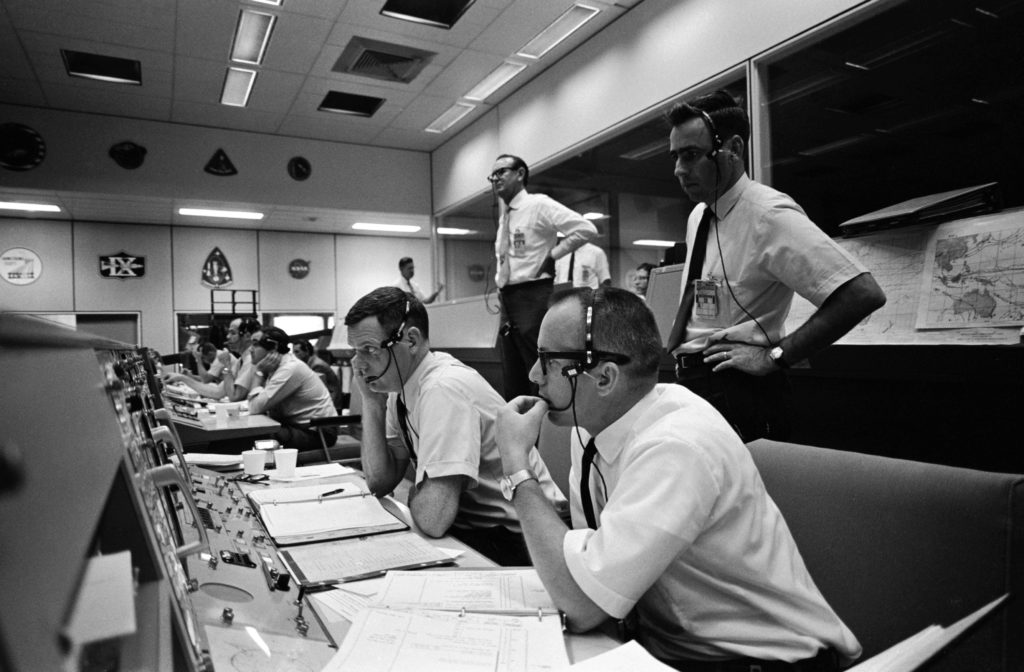
The decision ultimately landed on the laps of two guys barely out of college: twenty-six-year-old Steve Bales, the mission controller for guidance and navigation, and one of his backroom support team, twenty-four-year-old computer whiz kid Jack Garman. A quick review of their master list of program alarms revealed the 1202 to be “executive overflow” — the computer had too much to do. But Garman knew firsthand that program alarms were built into the computer solely to test the software. During software development, these alarms were testing computing cycles. By their very definition, they shouldn’t happen in flight.
To Abort or Not to Abort
What Gene Kranz needed to know, and fast, was what to do. Should the astronauts land? Should they abort? Were they in danger? Were they blowing up? Bales scoured his guidance and navigation data, while Garman consulted his handwritten program alarm list that had been mandated by Kranz and was now neatly stashed beneath plexiglas on his console.
As it turned out, NASA mission controllers had faced a similar program alarm during the very last simulation, with a backup crew, before the liftoff of Apollo 11. During that practice session the simulation supervisor had asked Garman to concoct a computer glitch for the controllers to solve. Garman now remembered the hidden testing alarm. It wasn’t a 1202, but it was a similar type — one that should never happen in actual flight. During that simulation, Bales had called for an abort…but it was the wrong call. While the computer was clearly having difficulties, it would still have been safe to continue the landing because all of LEM’s critical functions were still working. Generally, after software bugs had been removed during development, programmers might go back in and remove all their testing alarms. But often it was simply more efficient (and therefore cheaper) to just leave them buried unseen, deep down in the software. One of those alarms had now surfaced.
The Importance of Documentation
As a result of that simulation, Garman recalled, Gene Kranz, “set us all down and said, ‘you WILL document every single program alarm, every single possible one that can happen, and what we should do about it if it happens’.” Fortunately, this exhaustive written record ended up including the “nonexistent” program alarms as well. As they would discover later, what seemed like an impossible situation wasn’t a false alarm. “Executive overflow” simply meant that the computer was too busy.
When faced with the unreal reality of the 1202 alarm as the Eagle was preparing to land on the Moon, Steve Bales determined that the AGC had not lost track of LEM’s altitude or speed and still had its guidance control. Gene Kranz had in the meantime determined, with input from his controllers, that all other systems were functioning within acceptable parameters. Garman and Bales assured Kranz that there was no problem, and Mission Control gave Armstrong and Aldrin a “go” for landing, even as the alarms continued.
As it turned out, what had caused the alarms was that LEM’s rendezvous radar had been sending streams of errant signals to the computer, even though the radar was’t used while landing. Because of an electrical problem inside the lunar module wiring, the rendezvous radar was pouring signals into the computer as the Eagle was headed for landing, which overloaded it. The computer knew those signal were irrelevant to the Moon landing, so it dumped them, wiped itself clean, started again…and sounded the alarm. The alarms were merely informational. The computer wasn’t in trouble; it was just telling the astronauts and Mission Control what it was doing.
Two Geeks and a Computer Save the Day
In the end, the Apollo 11 Moon landing was saved because of the thorough preparation, quick thinking, and composure of a couple of guys under 30 whose expertise was trusted by their boss. But once again, the hero was also the “fourth crew member” of Apollo 11 — the 192-pound AGC. Charles Fishman, the author of “One Giant Leap,” offers the following perspective: “The 12-minute flight from 50,000 feet in lunar orbit to landing was the most demanding moment for the Apollo computer in the whole journey from Launchpad 39-A to the Pacific Ocean. And in that very moment, on that very first Moon landing, a small flaw in the wiring harness of the lunar module overloaded the computer that was controlling that landing, and the computer was able to perfectly pick the work that absolutely had to be done, and also restart itself so it didn’t freeze. Both of the Apollo computer’s most innovative qualities — the decision-making ability and the ability to restart itself in the middle of its work and resume working without a stumble — turned out to be absolutely essential and to work perfectly.”